Use this trigger tester to check how LT, RT, L2, and R2 respond from rest to full press.
Connect your controller, press each trigger slowly, then compare how both sides start, climb, peak, and return after release.
For standard analog gamepad buttons, browsers can report values from 0.0 when released to 1.0 when fully pressed.
Trigger Tester
Test Your Controller Triggers Online
Start with both triggers fully released.
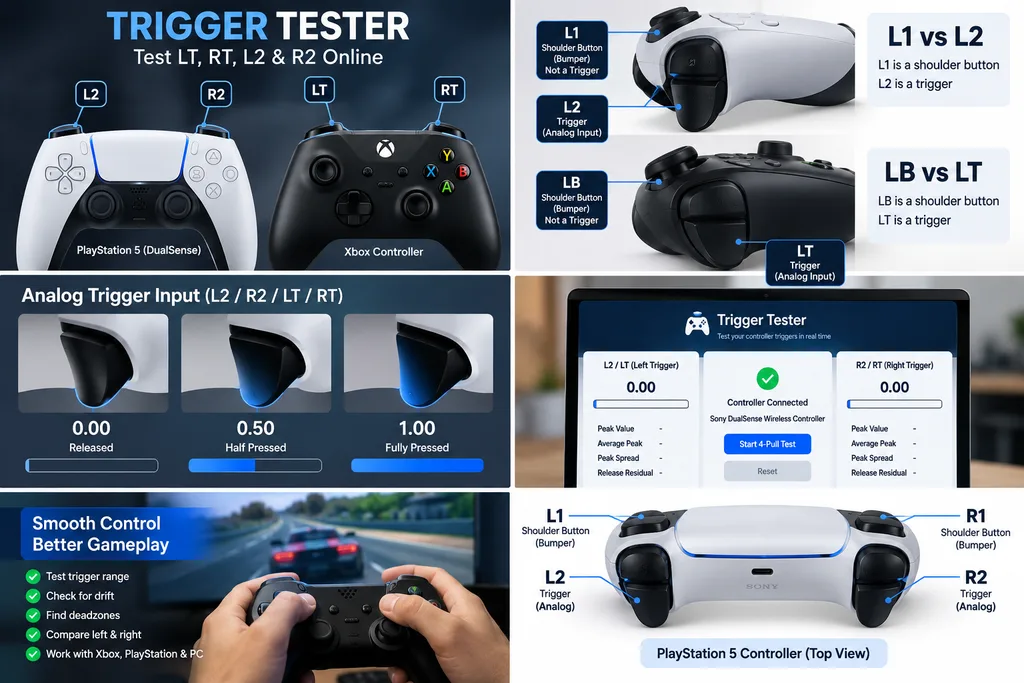
Then press one trigger slowly from top to bottom while watching the live reading.
Do not judge the trigger from one fast pull.
A slow press makes it easier to spot a trigger that starts late, jumps through part of its range, stops short, or stays active after release.
Test LT and RT separately, then repeat the same test on both sides.
Our Four Pull Trigger Check
Instead of judging a controller from one reading, use four slow pulls on each trigger.
This gives you a small first-party test from your own controller instead of relying on somebody else’s percentage.
Step 1: Record the Resting Value
Leave the trigger untouched for about two seconds.
This becomes your baseline.
For a standard mapped analog trigger, the browser normally reports a released value near 0.0.
Step 2: Make Four Slow Pulls
Press the trigger from rest to full travel four times.
Use roughly the same speed each time.
Record the highest value reached on every pull.
Step 3: Hold Full Press Briefly
At the bottom of each pull, hold the trigger for about one second.
This helps show whether the peak stays stable or moves around.
Step 4: Release It Completely
Let the trigger return on its own.
Watch whether the value returns close to the same resting point each time.
The useful part is repeatability, not chasing one perfect decimal.
Trigger Consistency Metrics
For this page, four simple measurements give more useful information than a single pass or fail label.
Resting baseline is the trigger value while untouched.
Peak spread is the difference between the highest and lowest peak across your four pulls.
Peak spread = highest peak − lowest peak
Release residual measures how far the trigger stays away from its normal resting point after release.
Release residual = post-release value − resting baseline
Left/right peak gap compares the typical full press result of both triggers.
Left/right peak gap = |left peak − right peak|
These numbers are most useful when you compare the controller against itself.
There is no universal percentage that proves a trigger is good or bad across every controller, firmware version, browser, and game.
What Do Trigger Values Mean?
The Gamepad Tester API can expose analog buttons as numbers between 0.0 and 1.0.
0.0 represents an unpressed analog button.
1.0 represents a fully pressed analog button.
Values between them represent intermediate reported input.
A reading of 0.50 means the browser is receiving roughly half of the normalized input range.
It does not mean the trigger has physically moved exactly 50 percent of its mechanical travel.
The browser receives controller input data. It is not measuring trigger distance with a physical sensor of its own.
Are Controller Triggers Analog or Digital?
Many modern controllers use analog triggers.
An analog trigger can report different values depending on how far you pull it.
Steam describes a trigger as a single-axis input that is sensitive to different amounts of pull.
That matters in games where partial input is useful.
In a racing game, RT may control throttle and LT may control braking. A light pull can request less input than a full pull.
Some gamepads or controller modes may expose a trigger as a digital input instead.
A digital input usually behaves more like OFF and ON.
If your trigger jumps straight between two states, check the controller type and mapping before assuming the trigger is faulty.
Trigger Test vs Button Test
A normal button check mainly tells you whether the input turned on.
A trigger check goes further.
It shows how the analog value changes while you press and release the control.
The Gamepad API exposes both a pressed state and a numeric value for gamepad buttons.
That is why A, B, X, or Y can look fine in a simple button test while an analog trigger may still behave poorly across its travel.
What Is a Trigger Deadzone?
A trigger deadzone tester is a part of the trigger’s movement that software ignores.
A starting deadzone can stop an accidental light touch from registering.
An ending threshold can make the trigger reach maximum input before the physical trigger reaches the bottom.
Sony’s DualSense Edge software gives a clear example. PlayStation allows users to set the trigger input range so the game begins registering the trigger at one point and reaches maximum input at another.
For example, Sony documents a range such as 30 to 70, where input begins after 30 and reaches its maximum at 70.
This is different from a broken trigger.
A trigger can be physically healthy while a custom deadzone or controller profile changes how early or late the game responds.
What Is Trigger Drift?
Trigger drift is unwanted trigger input while the control should be released.
You may notice a car applying a small amount of throttle by itself, a brake staying slightly active, or a browser reading that does not return to its usual resting value.
Do not judge this from one frame.
Release the trigger four or five times and compare the resting values.
A repeatable residual input is more meaningful than one random number.
Why Does My Trigger Show Input While Released?
First compare the current reading with its normal resting baseline.
If the trigger keeps returning to the same small nonzero number, that may be the way the device or mapping is exposing its resting state.
If the value changes after every pull or remains clearly above its normal baseline, look closer.
The cause can come from the trigger mechanism, sensor behavior, calibration, firmware, remapping software, or the controller profile.
Browser mapping also matters because recognized controllers can be remapped to the standard Gamepad layout while other devices may be exposed differently.
Why Does My Trigger Start Responding Late?
A late response does not always mean hardware failure.
Check whether the browser value begins changing as soon as you start pulling.
If the browser responds immediately but the game does not, check the game’s trigger settings or controller profile.
If the browser also shows a large physical movement before any value appears, repeat the pull on the opposite trigger.
That side-by-side comparison is much more useful than guessing.
On controllers with adjustable trigger deadzones, the starting point can be changed intentionally. DualSense Edge profiles, for example, can alter where L2 and R2 begin registering.
Why Does My Trigger Reach Maximum Too Early?
Some controller settings intentionally shorten the usable input range.
That can make the browser or game reach maximum input before the trigger reaches the bottom of its physical travel.
This is not always a problem.
Competitive players sometimes use shorter trigger travel or custom trigger profiles so an action reaches full input sooner.
Compare both triggers and check the controller’s saved profile before treating the behavior as a fault.
Why Does My Trigger Stop Before Full Input?
Pull the trigger slowly four times.
Write down the highest reading from each pull.
If the peak is almost the same every time, the behavior is repeatable.
Then compare it with the other trigger.
If one side repeatedly reaches a very different maximum while both use the same settings, investigate the controller profile, calibration, trigger stops, or hardware.
Do not mark a controller defective simply because it shows 0.99 instead of 1.00.
The API defines a normalized range, but real controller mappings and software paths can vary.
Why Does My Trigger Value Jump?
First confirm that the trigger is analog.
If it is, press it as slowly as possible.
A clean analog pull should normally produce intermediate values rather than behaving only like a digital switch.
If the reading repeatedly skips through the same section, compare that exact section on the other trigger.
Then test a game where partial trigger input matters.
For a racing game, a jump can show up as throttle or brake input that is hard to control smoothly.
That is a more useful real-world check than watching numbers alone.
Why Does My Racing Game Show Partial Throttle?
Hold RT fully down and watch the tester.
If the browser reports full or near-full normalized input but the game still shows partial throttle, the problem may be inside the game’s input setup.
Check the throttle range, trigger deadzone, controller profile, Steam Input, and any custom controller software.
If the browser itself repeatedly stops far below the trigger’s normal peak, then the controller signal deserves more attention.
This split helps you separate a game setting from a controller-side problem.
Why Does My Brake Stay Slightly On?
Leave LT untouched and watch its baseline.
Then squeeze and release it several times.
If the brake problem appears in the game but the trigger consistently returns to its normal browser value, inspect the game’s brake deadzone and calibration settings.
If the trigger itself stays above its normal baseline after release, compare the result across several pulls.
For racing players, this matters because even a small unwanted brake input can affect acceleration and top speed.
How Do I Compare LT and RT Properly?
Do not press both at the same time.
Test LT first.
Make four slow pulls.
Then test RT with roughly the same speed.
Compare resting value, first response, peak value, smoothness, and return behavior.
The triggers do not need to produce frame-for-frame identical numbers.
You are looking for a difference that repeats.
For example, one trigger reaching the same peak four times while the other varies widely is more interesting than one isolated bad pull.
How Do I Test Xbox Controller Triggers?
Connect the Xbox controller to your PC and let the browser detect it.
Under the W3C Standard Gamepad mapping, button index 6 is the lower left front control and button index 7 is the lower right front control. These positions normally correspond to the left and right triggers on standard mapped controllers.
Check whether the browser reports the controller mapping as standard.
Then test LT and RT one at a time.
Watch both the analog values and their return after release.
If the mapping is not standard, do not assume buttons 6 and 7 will always be the correct inputs.
How Do I Test PS5 L2 and R2?
Connect the DualSense controller to a Windows PC with USB Type-C or Bluetooth.
Sony supports both connection methods for DualSense on compatible PCs.
Press a controller button so the browser detects the device.
Leave L2 and R2 released.
Record their resting values.
Press L2 slowly four times and release it completely after each pull.
Repeat the same process with R2.
If you use custom profiles or a DualSense Edge, check those settings before comparing the two sides.
Can I Test DualSense Edge Trigger Deadzones?
Yes.
The browser can show the analog input it receives from L2 and R2.
DualSense Edge adds another layer because PlayStation lets users customize trigger deadzones and input ranges through the PlayStation Accessories app.
That means two healthy triggers can behave differently if a custom profile is active.
When testing an Edge controller, note which profile is loaded.
For a fair left/right comparison, use matching settings on both triggers.
Does This Test DualSense Adaptive Triggers?
It tests trigger input, not the full adaptive resistance system.
These are different things.
The browser can read how much trigger input the controller reports.
DualSense adaptive triggers can also change the physical resistance you feel while pulling L2 or R2 in supported games.
Sony confirms that adaptive triggers work in supported PC titles, with connection requirements depending on the game and feature.
A clean 0.0 to 1.0 input test does not prove that adaptive trigger resistance is working correctly.
Why Does My Browser Show the Wrong Trigger?
Check the controller’s mapping.
The W3C Gamepad specification defines one canonical Standard Gamepad layout. A browser can remap a recognized controller into that layout.
If the browser does not recognize the controller, the device can be exposed using a different arrangement.
This matters with generic USB pads, adapters, third-party controllers, and gamepads that have several operating modes.
A trigger that works in a game but appears in an unexpected place in a tester may be a mapping issue rather than a dead input.
Why Are My Triggers Showing as Axes?
Not every controller reaches the browser through the same mapping.
The Standard Gamepad layout treats the lower front triggers as buttons with analog values, but unrecognized devices can expose their controls differently.
Some older gamepads, drivers, adapters, or compatibility modes may expose trigger information through axes.
If the expected trigger button does not move, check the device mapping before assuming the control has failed.
Does USB or Bluetooth Change the Trigger Reading?
It can change the path the controller uses to reach the system, but that does not mean one connection automatically gives a better analog value.
Use USB as a controlled comparison when Bluetooth results look strange.
Keep the controller profile and browser the same, then repeat the same four pulls.
If the trigger behaves the same way over both connections, the wireless link is less likely to be the only cause.
For DualSense, some advanced PC features can also depend on the game and connection method.
Can a Trigger Pass a Button Test and Still Be Bad?
Yes.
A simple button test may only show that the trigger crossed the pressed threshold.
It may not reveal whether the analog range is smooth.
A trigger can still register as pressed while starting late, stopping early, jumping through part of the range, or staying slightly active after release.
That is why a live analog value is more useful for LT, RT, L2, and R2.
Trigger Test vs Stick Deadzone Test
A trigger is usually a one-direction analog control.
An analog stick moves around two axes.
A stick deadzone mainly deals with movement around a two-dimensional center point.
A trigger deadzone deals with where a pull begins or where full output is reached.
Do not apply stick drift percentages or stick circularity rules to triggers.
They measure different input behavior.
Our Test Method
The goal of this page is repeatability, not a fake universal pass score.
Use the same controller, browser, connection type, firmware, and controller profile during one comparison.
Leave the trigger untouched long enough to establish its normal baseline.
Use four slow pulls rather than one.
Record the peak from each pull.
Release the trigger completely after every press.
Compare the post-release value with the original baseline.
Then repeat the same process on the opposite trigger.
This creates a controller-specific baseline that you can reuse after calibration, profile changes, or repair.
How to Compare Results After a Repair
Save the resting value and four peak readings before making any change.
After the repair or adjustment, repeat the same test under the same conditions.
Compare the new results against the old ones.
This before-and-after method is more useful than comparing your controller with an arbitrary number from another model.
If the trigger becomes smoother, returns closer to its own baseline, and produces more consistent peaks, the test gives you measurable evidence that the behavior changed.
When Should You Check Controller Settings First?
Check the profile before considering repair when the trigger behaves smoothly in the tester but feels wrong only in one game.
This is especially important with DualSense Edge because trigger deadzones and input ranges are directly adjustable in PlayStation’s PC software.
Also check Steam Input if you are playing through Steam.
Steam treats triggers as analog inputs and can process controller behavior before the game receives it.
When Is Hardware More Likely to Be the Problem?
Hardware becomes more suspicious when the same trigger problem repeats across different software while the controller settings stay unchanged.
A trigger that physically sticks, fails to spring back, repeatedly loses part of its range, or produces the same sharp jump during every slow pull deserves closer inspection.
The important word is repeatably.
One unusual reading is weak evidence.
The same failure pattern across many pulls is much stronger evidence.
What This Trigger Tester Can Measure
A browser tool can measure the input values exposed through the Gamepad API.
That includes the current analog value, pressed state, controller identity information, button array, mapping state, and other available gamepad data.
From those readings, a tester can compare resting input, peak input, pull consistency, left/right differences, and return behavior.
What This Trigger Tester Cannot Measure
The browser cannot look inside the controller.
It cannot directly measure spring tension, physical travel in millimeters, internal wear, solder joints, trigger gears, magnetic field strength, or adaptive resistance force.
It also cannot prove what a specific game will do with the signal after receiving it.
Treat the result as an input diagnostic.
Do not treat it as factory certification.
FAQS
What Should a Trigger Read When Released?
For a standard normalized analog gamepad button, 0.0 represents an unpressed state.
If your controller sits slightly away from that value, repeat the test and compare it with its own normal baseline before deciding something is wrong.
What Should a Fully Pressed Trigger Read?
The standardized analog button range reaches 1.0 at full reported input.
Do not automatically fail a controller because one pull shows 0.99. Look at repeated peak behavior and the controller mapping.
Why Does My Trigger Only Show 0 and 1?
The controller or current mode may be exposing that control as a digital input.
Check the device type and mapping.
A digital trigger or button does not provide the same gradual analog range.
Can Triggers Have Deadzones?
Yes.
Controller software or games can ignore the beginning or end of trigger travel.
DualSense Edge specifically supports adjustable trigger deadzones and input ranges.
Can I Test PS4 L2 and R2?
Yes, if the browser recognizes the DualShock 4 and exposes its trigger inputs.
The exact mapping can depend on the browser, operating system, controller mode, and connection.
Can I Test Xbox Elite Triggers?
Yes.
Check LT and RT as analog inputs, but remember that controller profiles and physical trigger stops can change how the pull feels.
Compare repeated readings rather than relying on one press.
Does This Measure Trigger Input Lag?
No.
A live trigger value shows the current state reported to the browser.
True end-to-end input latency needs a controlled timing test designed specifically for latency measurement.
Does the Number Measure Trigger Pressure?
No.
The value represents normalized controller input.
It does not directly measure force in newtons, pounds, or another physical pressure unit.
Can the Tester Repair My Trigger?
No.
It helps you observe and compare input behavior.
Calibration, controller settings, mechanical repair, and replacement are separate actions.
Sources and Technical Basis
Browser trigger values and button states on this page are based on MDN’s Gamepad API documentation. MDN documents analog GamepadButton.value as a normalized value from 0.0 to 1.0.
Controller layout and mapping references follow the W3C Gamepad specification, including the Standard Gamepad button ordering and browser remapping rules.
DualSense and DualSense Edge information is based on current PlayStation documentation covering PC connections, adaptive triggers, controller profiles, and configurable trigger deadzones.
Steam Input references use Valve’s Steamworks documentation describing analog triggers and controller input processing.